









What are AI agents for virtual assistants?
An AI agent for virtual assistants is software that owns an area of the practice, not a single task.
Inbox tools like Fyxer own message triage. Business platforms like Blynq help interpret the business context behind them.
Both keep that area's context between uses, unlike a chat window. Neither manages the client relationship, so that stays yours.
Learn how to run your business with an AI teamWhich AI agents can help run a VA practice?
The AI agents that help run a VA practice are 8 business roles: Operations, Sales, Marketing, Client Experience, Finance, Analytics, Strategy and Productivity.
The useful starting point is not a separate agent per client, task or inbox.
A small set of agents works better, each owning a meaningful part of the practice.
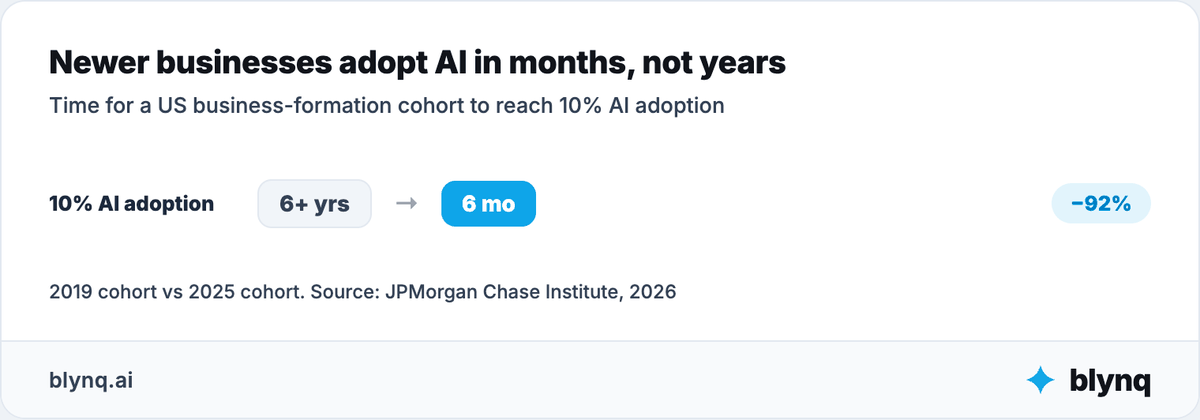
New businesses are picking up AI far faster than established ones.
JPMorgan Chase Institute found the 2025 business-formation cohort reached 10% AI adoption within 6 months, versus over 6 years for the 2019 cohort.
| AI Agent | What it can help a virtual assistant do | Most useful when |
|---|---|---|
| Operations Agent | Review delivery process, recurring work, handoffs, deadlines and capacity | Client work overlaps and details start slipping |
| Sales Agent | Qualify inquiries, scope retainers, price proposals and follow up on upsells | Inquiries arrive but convert into low-value hourly work |
| Marketing Agent | Clarify which clients the practice serves and explain strategic services | The practice takes any task from any client and the niche is unclear |
| Client Experience Agent | Draft client replies, manage onboarding and flag accounts needing attention | Clients only hear from you when something is late |
| Finance Agent | Review retainer economics, hourly rates and per-client profitability | Billable hours look full but margin keeps shrinking |
| Analytics Agent | Connect client type, hours logged, task mix and profit per client | Practice data does not explain which clients are worth keeping |
| Strategy Agent | Compare service tiers, niches and pricing models | Manual task work is being commoditized around you |
| Productivity Agent | Turn deadlines, client tasks and admin work into a realistic weekly focus | Everything feels urgent across every client |
These 8 support the practice side. Virtual assistants also use specialized agents and tools for narrow execution.
Common examples include inbox triage, calendar management, meeting transcription, spreadsheet cleanup and workflow automation.
The distinction matters. An Operations Agent can diagnose why three clients' tasks are always late.
An inbox-triage agent sorts and categorizes the email itself. One supports the decision; the other runs a defined workflow.
What counts as an AI agent for a virtual assistant?
An AI agent for a virtual assistant is software that holds an ongoing responsibility. A chatbot answers one question; a tool finishes one job.
The terms get confusing quickly. Here is the simplest way to tell the 4 shapes apart.
| Chatbot | AI Tool | AI Agent | AI Team | |
|---|---|---|---|---|
| What it does | Answers a question | Completes a specific job | Helps own an ongoing responsibility | Helps across several parts of the practice |
| What you do | Ask each question | Open or trigger it when needed | Give it a goal or responsibility | Give the team access to shared practice context |
| What it knows | Usually the conversation or limited product memory | Information needed for its job | Context relevant to its role | Context shared across different specialists |
| Virtual assistant example | "Draft a reply to a client asking for a refund" | Transcribe a client's meeting into notes | Own onboarding and delivery across every retainer client | Operations, Finance and Sales work from the same practice understanding |
So stop asking whether something is technically an agent. Ask 3 better questions instead.
What will it take responsibility for? What information will it use? What will you still have to review?
How can AI help you run a VA practice?
AI helps run a VA practice by removing repetitive inbox work, calendar conflicts, meeting note-taking and the guesswork connecting task mix to profit.
Find your problem in the left column before shopping for anything.
| Recurring problem | What AI can help remove | Best-fit agent or AI setup | When to prioritize it |
|---|---|---|---|
| Inbox triage eats the morning | Sorting, categorizing and drafting first replies | Operations Agent + inbox-triage tool | When client emails arrive faster than you can read them |
| Calendars keep conflicting | Scheduling, rebooking and focus-block protection | Operations Agent + calendar tool | When back-to-back client calls leave no delivery time |
| Meeting notes take too long | Transcription, summaries and action-item extraction | Specialized transcription tool | When long client calls need a written record |
| Spreadsheet cleanup is tedious | Formatting, formula work and data entry | Specialized spreadsheet tool | When reporting eats hours better spent on client work |
| Client replies pile up | Drafting responses and organizing recurring requests | Client Experience Agent | When clients wait days for a simple answer |
| Task work looks interchangeable | Distinguishing manual execution from strategic orchestration | Strategy Agent + Marketing Agent | When clients treat every task as equally billable |
| Onboarding a new client is slow | Checklists, welcome materials and kickoff prep | Client Experience Agent + onboarding workflow | When new retainers take weeks to ramp up |
| Rates feel stuck | Connecting task type, hours and client value | Finance Agent + Analytics Agent | When execution-only clients cap what you can charge |
| Capacity is unclear | Connecting active clients, task volume and deadlines | Operations Agent + Productivity Agent | Before taking on another retainer |
| Client acquisition is inconsistent | Connecting inquiries, discovery calls and signed retainers | Sales Agent + Analytics Agent | When referrals slow down and pipeline gets thin |
| Priorities are unclear | Connecting goals, deadlines, commitments and constraints | Strategy Agent + Productivity Agent | When everything feels urgent across every client |
This is a map, not a shopping list. Some problems need a tool. Others need a skill inside a business role.
Others still need a specialized agent that owns a workflow, or several agents working from shared context.
Diagnose the bottleneck before choosing the system.
How should a virtual assistant choose what to give an AI agent first?
A virtual assistant should choose the first AI agent from the bottleneck blocking a named result, not from the most impressive automation demo.
Suppose you want higher rates without working more hours. "Automate the task list" sounds like the obvious answer.
But stuck rates have at least 6 possible causes:
- Clients only book you for manual execution work.
- Task work looks interchangeable with what any tool can already do.
- No clear service tier separates execution from strategy.
- Too many clients priced at a flat hourly rate regardless of task value.
- Scope creep goes untracked and unbilled.
- More clients than the practice can serve without dropping quality.
Automating the execution work would make several of these worse, not better.
This risk has a name in the research.
AI-assisted, AI-supervised entry-level VA work compresses to $3 to $6 an hour. Strategic, AI-orchestration work commands $34 to $100 an hour.
One hiring post on Reddit offered exactly $6 an hour for VAs to build websites with Claude, no coding required.
Reddit thread on AI website-building gigs
That is the same AI capability priced at opposite ends of the market. The difference is who is doing the orchestrating.
Work this sequence before choosing an agent or tool:
| Step | Virtual assistant question |
|---|---|
| Goal | What practice result needs to change? |
| Bottleneck | What is preventing that result today? |
| Responsibility | Which area owns the problem? |
| Capability | What must AI analyze, recommend or execute? |
| Context | What must it know to give a useful answer? |
| Constraints | What limits budget, time, capacity or risk? |
| Human boundary | What judgment stays with you? |
| Architecture | Is the right fit general AI, a broad agent, a specialized system or an AI team? |
Do not design the practice around what AI can do. Design the AI around what the practice needs to achieve.
How do roles, skills and tasks show up in VA work?
Roles are the practice area an agent owns, skills are what it can do inside that area, and tasks are the work happening right now.
These terms get used interchangeably. Keeping them apart stops you buying a separate system for every small job.
| Concept | Definition | Virtual assistant example |
|---|---|---|
| Agent | AI entity holding ongoing responsibility | Operations Agent |
| Role | Business domain the agent owns | Operations |
| Skill | Capability used inside the role | Client task-load review |
| Task | Specific work being done now | Sort this week's inbox by client and urgency |
| AI Tool | Product for a particular job | Meeting-transcription tool |
| Automation | Predefined workflow | Send a reminder when a client task is overdue |
| Specialized Agent | System owning a narrow ongoing workflow | Inbox triage across every client account |
| AI Team | Several agents sharing practice context | Operations, Finance and Sales using the same practice knowledge |
| AIOS | Operating layer connecting agents, skills, memory, knowledge, tasks and workflows | Shared AI operating environment for the practice |
The core idea is simple. Agents are roles. Skills are capabilities. Tasks are the work being done.
Automation alone does not make something an agent. Neither does an "agent" label on a product page.
Does every VA task need its own AI agent?
No. Most VA tasks are skills inside a role you already have, not grounds for buying another agent.
The taxonomy matters because it stops an AI stack becoming a new kind of software clutter.
Formatting one client spreadsheet is not a Spreadsheet Agent. It is a task using a data-entry skill inside Operations.
Drafting one difficult client reply is not a Communications Agent. It is a task using a writing skill inside Client Experience.
A system that reads every incoming email, categorizes it by client, drafts a first response and flags what needs your attention is different.
That may qualify as a specialized agent, because it owns a narrow but ongoing workflow.
One EA described exactly this kind of setup, built once and reused across every triage session.
"Once the rules are in a Claude Project, all you have to do is screenshot the inbox and it will categorize and tell you how to process the emails."
Reddit user Senior_Dog2381 wrote that in r/ExecutiveAssistants, a forum where executive and virtual assistants trade workflow tips. Reddit thread on Claude inbox triage
The rules had to exist first. Undocumented preferences do not triage themselves.
The difference is responsibility, not branding.
How can AI support the practice behind the client tasks?
AI supports the practice behind the client tasks in 3 connected places: winning the right clients, delivering the work reliably, and protecting the rate underneath.
How do you turn manual work into strategic retainers?
You turn manual work into strategic retainers by deciding which clients need orchestration rather than execution.
That is Sales and Strategy work, not task work.
A Marketing Agent can clarify which clients the practice serves and explain strategic services in language a busy founder understands.
The hard question is not how many tasks AI can complete. It is which clients would pay for judgment and are being billed hourly instead.
A Sales Agent works deeper than a rate-card conversation. It reviews the client list, compares task types and finds accounts still priced as pure execution.
It can diagnose where the upsell conversation stalls. A specialized workflow then prepares the scoping questions and the proposal.
The payoff is documented in the wage data itself.
Standard human VA billing spans $10 to $100 an hour, with a median of $20 for general admin work and $34 for executive support.
AI-supervised execution work compresses toward the bottom of that range, at $3 to $6 an hour.
Orchestration and strategic support hold the top, closer to $34 to $100 an hour.
The business question is not only whether AI can do the task.
The real questions are which clients matter, why they still pay hourly, and what the relationship can carry.
How do you keep client work moving without dropping anything?
You keep client work moving by giving an Operations Agent the delivery process itself, then using specialized tools for inbox, calendar and notes.
Delivery work combines client inboxes, calendars, meeting notes, recurring tasks, deadlines and several client relationships running in parallel.
An Operations Agent can analyze that process, find where handoffs slip and clarify what needs attention now.
Specialized tools can triage an inbox, transcribe a meeting or clean up a spreadsheet.
Task-level compression is real, and one hiring post shows how far it can go.
A video-editing VA role advertised 99% of the editing handled by AI tools, with the human supervising and uploading.
That posting paid $5 an episode. Reddit hiring post for AI-assisted video editing
AI compresses execution time dramatically.
It does not compress the judgment about what to do with the time saved.
That is why that role stayed priced at the bottom of the market.
Client Experience uses the same context to prepare clearer updates and draft the replies that protect a relationship under pressure.
AI should help you remember and prepare. It should not impersonate attention or make a client feel handled by a machine.
You still own the judgment calls, the tone in a difficult reply, and every commitment made to a client.
How do you protect your rate and your capacity?
You protect your rate by connecting task type to hours to client value, which is Finance and Analytics work rather than task work.
More clients do not automatically mean a better practice. Underpriced execution work, scope creep and tool subscriptions can hollow out a full client roster.
An EA who tracks this closely described the discipline behind it.
"I've been tracking the tasks I've asked AI to complete or assist with and if AI required human intervention. It's been very helpful for my anxiety and one of my leaders was very interested in what I've captured."
Reddit user PlainJaneLove wrote that in r/ExecutiveAssistants. Reddit thread on tracking AI task outcomes
That log does double duty. It proves which tasks still need a human, and it builds the evidence for a rate conversation.
Finance and Analytics can connect client type, task mix, hours logged and realization.
Strategy and Productivity then connect those findings with capacity, niche and a realistic weekly focus.
The goal is not more possible actions. It is a reasoned choice about which clients, service tiers and task types deserve limited attention.
What happens when you trace one problem across the whole practice?
Tracing one rate problem across the whole practice usually finds a positioning and client-mix problem instead.
Consider a solo VA whose hours are full but income has stalled. The instinct is to automate faster and take on more clients.
Sales analysis shows most clients book pure execution work: data entry, formatting, scheduling. Strategy finds no service tier exists above hourly task work.
Finance shows the execution-only clients are the ones AI is compressing fastest, which caps what they will ever pay.
Marketing recommends naming a strategic tier before adding volume, so new clients buy orchestration instead of hours.
An inbox-triage tool still helps free up time. But adding more execution clients first would have accelerated the wrong problem.
The value comes from examining one problem through connected perspectives, before execution scales it.
Where do specialized VA AI tools and agents fit?
Specialized VA AI tools and agents fit where the bottleneck is narrow and execution-heavy.
That covers inbox triage, calendar management, meeting transcription, spreadsheet work and task automation.
Business agents and agents built for one job do different work.
| Business Agent layer | Specialized execution layer |
|---|---|
| Diagnoses, plans and ranks across a role | Performs or owns a defined workflow |
| Uses broad practice context | Uses workflow-specific or client-specific data |
| Connects questions across functions | Goes deeper inside one execution category |
| Example: determine why a client's rate stayed flat | Example: transcribe and summarize a client call |
The market holds several kinds of product. ChatGPT, Claude and Gemini support general research, drafting and analysis.
Fyxer triages and drafts replies to an inbox. Otter.ai transcribes meetings into notes and action items.
Motion and Reclaim.ai automate scheduling and defend blocks of focus time on a calendar.
Zapier connects tools and moves data between them, though it assumes you have already mapped the workflow it should run.
Claude specifically shows up often in the practitioner accounts behind this guide.
One EA uses it to strip formatting work out of spreadsheets. Another built reusable email-triage rules inside a Claude Project.
These products are not interchangeable. An inbox tool does not decide whether your rate reflects the work you actually do.
A transcription tool does not decide which clients to pursue.
An automation platform executes the workflow you built, but you define the rules, the exceptions and the escalation path.
Blynq sits on the practice-management side. Its business roles work from shared context across Operations, Sales, Marketing, Finance, Analytics and Strategy.
The right setup often combines both: execution tools for the task work, and a connected set of business agents for the thinking and the decisions.
Do you need one specialist or a connected AI back office?
You need one specialist when the problem stays inside one responsibility, and a connected AI back office when it crosses several.
Practice questions cross functions constantly:
Marketing to inquiries to discovery calls to signed retainers to delivery hours to rate to profit to the next positioning decision.
A marketing recommendation may depend on which clients are actually profitable. An operations priority may depend on capacity.
A pricing decision may depend on the task mix behind a full calendar.
Use this rule:
| Situation | Likely starting point |
|---|---|
| One isolated output | Chatbot or tool |
| One repeatable workflow | Automation or specialized agent |
| One ongoing business responsibility | Broad agent role |
| A question crossing several business functions | AI team with shared context |
Why does practice context change VA AI recommendations?
Practice context can change VA AI recommendations completely, because the same question has opposite correct answers for different practices.
Consider a common question: should I raise my rates?
No responsible answer exists without the current client mix, task type by client and hours logged.
Capacity, competing service tiers and the referral sources behind each client matter just as much.
One VA needs more clients. Another needs fewer, better-paying ones. A third already has more work than the practice can serve without dropping quality.
Prompt-based work restarts from the same briefing every time: client list, service mix, tools used, deadlines, capacity and recent outcomes.
Context-aware AI starts from validated goals, constraints, decisions, actions, outcomes and lessons it already holds.
It should not remember everything indiscriminately. It should separate verified practice knowledge from assumptions and retrieve only what the current decision needs.
Why do AI agents need one shared view of the practice?
AI agents need one shared view because otherwise you are the integration point, manually carrying client profitability into pricing and capacity into intake.
Several agents do not become a team because they sit in one menu.
Operations may know delivery load, Finance may know realization, and Sales may know which clients still book hourly work.
If you connect them by hand, nothing has changed.
Solo VAs feel this sooner than agencies, because one person personally holds every role an agency splits across staff.
A useful shared view holds service mix, client segments, task types, delivery calendar, capacity, pricing model, current priorities and past decisions.
Client account access, passwords and business data need stricter handling than any of that.
Shared context does not replace role expertise. It makes Operations, Sales, Finance and Analytics relevant to the same practice.
Blynq is built around exactly that pattern. Its Operations, Sales, Finance and Analytics agents read from one shared practice profile, not four separate ones.
An AI team becomes an AIOS when agents, skills, knowledge, memory, tasks and workflows grow around that shared understanding.
The goal is not more AI. It is a practice that is easier to understand, decide for and run.
What do clients still need from a virtual assistant when AI gets faster?
Clients still need judgment, discretion and someone who reads the room, even when AI gets faster at the tasks themselves.
AI does not make virtual assistants irrelevant. It changes which parts of the job clients value.
Most small businesses see it that way too.
Research firm stateofaiforsmallbusiness.com found 87% of small-business owners view AI as an employee-augmentation tool rather than a worker-replacement tool.
Zapier separately found AI-adopting businesses are roughly 4 times more likely to increase hiring than to cut staff.
Quality perception splits sharply by business size.
Among owners of businesses under 10 employees, 52% say AI text generation performs worse than human work, versus 29% among large-enterprise decision-makers.
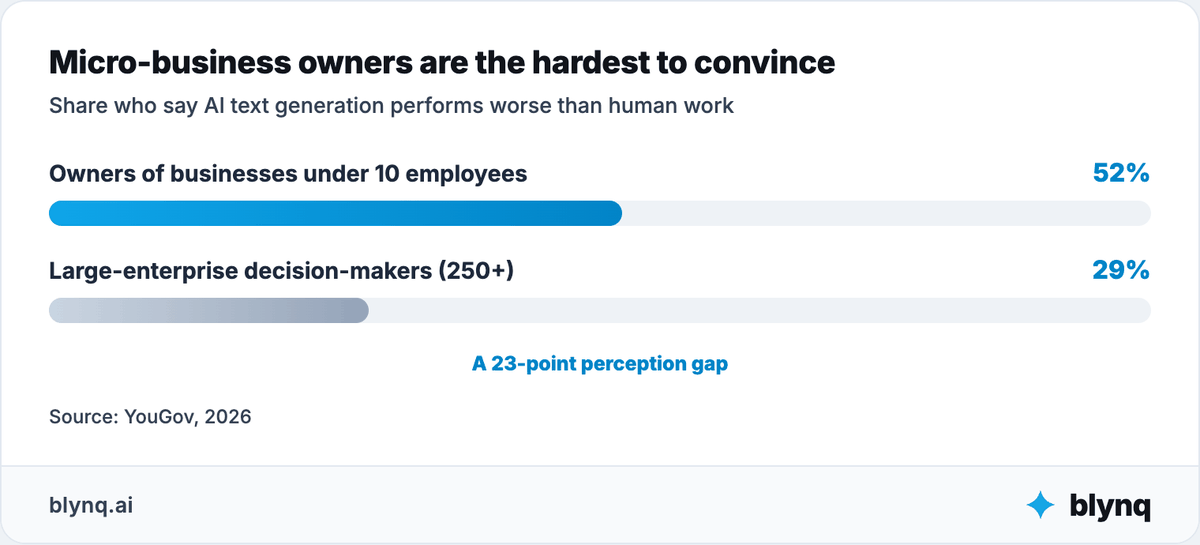
Micro-business owners are the toughest audience to convince the output is good enough on its own, according to independent pollster YouGov.
One EA put the real competitive threat plainly.
"If AI doesn't take your job, an EA that knows how to thoroughly utilize AI will..."
Reddit user elianna7 wrote that in r/ExecutiveAssistants, a forum where executive assistants compare notes on daily AI use.
Reddit thread on AI in EA work
AI is not competing with you. A peer who has learned to direct it well is.
AI still needs a human backstop on longer, messier work. One EA described the gap directly.
"For shorter meetings with clear decisions it's great, for 3hr meetings where the group talks in circles...it's trash. I have to weed out so many hallucinations it's actually more work."
Reddit user NoMove1288 wrote that in r/ExecutiveAssistants. Reddit thread on daily AI tools for EAs
When drafting, transcription and first-pass summaries get faster, clients still need someone who can:
- Read the room and catch what a transcript misses.
- Recognize when a task or client situation does not fit the usual process.
- Fact-check AI output before it reaches a client's inbox.
- Exercise judgment on a difficult or sensitive request.
- Coordinate across a client's other vendors and staff.
- Take responsibility for what actually got done.
One path uses AI mainly to process more tasks at the same hourly rate.
The other uses it to arrive better prepared and to sell the judgment that was always the scarce part.
The second path strengthens your role. The value moves from completing tasks toward directing what gets done and standing behind the result.
Where does VA work still need human judgment?
VA work still needs human judgment wherever client trust, sensitive data or a decision with real consequences is involved.
No license or governing board sets a virtual assistant's standard of care, unlike a realtor or a CPA.
The boundary here is contractual: your confidentiality agreement, your client's NDA, and each vendor's own data-handling terms.
The closer AI gets to client data and client relationships, the stronger that boundary should hold.
| Area | AI can help with | Human owns |
|---|---|---|
| Inbox management | Sorting, categorizing and drafting first replies | Tone, judgment calls and anything sensitive |
| Calendar management | Scheduling, rebooking and conflict detection | Priority calls when commitments compete |
| Meeting notes | Transcription and summary drafts | Verifying accuracy on long or unfocused calls |
| Client communication | Drafting responses and organizing requests | Difficult replies and relationship judgment |
| Data entry | Formatting, categorization and cleanup | Accuracy checks on anything client-facing |
| Onboarding | Checklists, welcome materials and reminders | The first impression and the relationship itself |
| Task automation | Running defined, repeatable workflows | Deciding what should be automated at all |
| Client data | Organizing and retrieving within a client's own tools | What leaves your systems, and under what tier |
| Pricing | Organizing inputs and scenarios | The rate you actually charge |
| Escalations | Flagging what looks urgent or unusual | The judgment call on what to do about it |
Client data is the sharpest risk in this list, and it is not hypothetical. One EA warned about it directly.
"Uploading anything to an LLM is sharing it with the company that owns it aka do NOT upload personally or organizationally identifiable information to it unless you are business or enterprise level accounts."
Reddit user mmcgrat6 wrote that in r/ExecutiveAssistants. Reddit thread on AI tool use and data handling
Consumer-tier subscriptions do not carry the same data protections as business accounts.
Some consumer tiers also reserve the right to use uploaded content for model training.
Confirm which tier you and every client-facing tool run on before any client data goes in.
The correct fallback is usually simple: hold anything sensitive back and ask the client directly.
AI should have an escalation path, not an unlimited mandate.
How do you choose the right AI setup for a VA practice?
You choose the right AI setup for a VA practice by evaluating its operating model, not its label.
Ask 6 questions of anything you are considering:
- What responsibility or workflow does it help own?
- What can it analyze, recommend or execute?
- What practice or client data can it access, and under what terms?
- Does it rely on verified source data?
- What must you review before it reaches a client?
- Does it integrate with the systems that matter, and show what it did?
Consider 3 legitimate approaches:
| Approach | Strengths | Trade-offs | Best fit |
|---|---|---|---|
| Custom build | Maximum control and client-specific rules | Technical ownership, maintenance and integration risk | Practices with technical support and distinctive processes |
| Self-directed Claude or ChatGPT | Flexibility, strong analysis and per-client instructions | You design the context, memory and orchestration | Advanced AI users who want control |
| Ready-made AI team or purpose-built SaaS | Faster setup, structured roles and continuity | More opinionated and limited to supported capabilities | VAs who want structure without building it |
Training gap, not tool access, decides which approach actually works.
Research firm Thryv found 70% of small-business owners admit they lack the skills to use AI effectively.
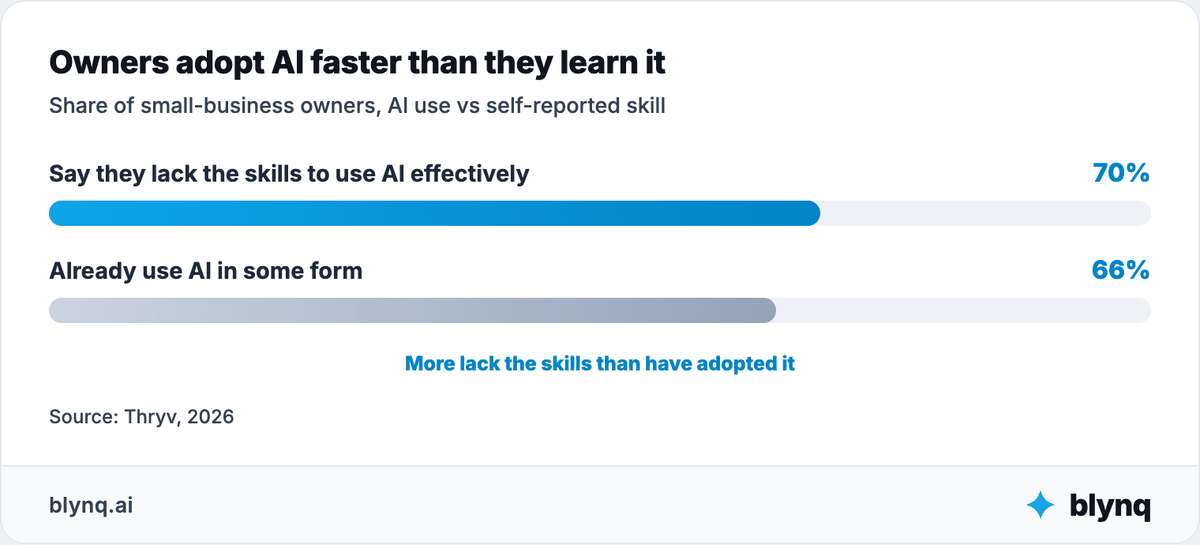
66% already use some form of it regardless.
Most rely on YouTube and vendor webinars rather than formal training.
Before committing, verify the system actually reads from and writes to what you need: your client's inbox, calendar, task tool, CRM or shared drive.
Check permissions, approvals, activity logs and failure handling. Ask specifically whether client data trains the vendor's models, and get the answer in writing.
Do not assume "works with" means "integrates with." If you constantly re-brief the system and copy data between tools, the AI is adding administrative work.
How do you put AI to work in your VA practice in 30 days?
Put AI to work in 30 days by picking 1 measurable goal and diagnosing the bottleneck behind it.
Run the agent alongside your current process, then expand only where it earned the expansion.
Start with the goal, not the tool.
Week 1: Diagnose
Choose a goal and a bottleneck. Do not start with a product.
Common candidates: inbox response time, meeting-note turnaround, or the share of clients still billed purely by the hour.
Define the 1 metric that would show improvement.
Exit criterion: a named metric and a current baseline number, written down.
Week 2: Build context
Give the system what judgment requires: client list, service mix, task types, delivery calendar, capacity, pricing and previous decisions.
Decide what stays private or needs controlled access. Client passwords, accounts and identifiable data belong in that category by default.
Exit criterion: the agent answers a question about your practice you did not have to re-explain.
Week 3: Run alongside the current process
Use the agent for analysis, planning or structured work while the existing process stays visible.
Review errors, missing context and drafts that do not match how a specific client actually communicates.
Exit criterion: a written list of what it got wrong and what context was missing.
Week 4: Evaluate and expand carefully
Measure the metric from Week 1. Record what the system learned and what still needs your review.
Add another skill or role only when it solves a real adjacent problem.
If the second role depends on knowledge from the first, prioritize shared context over another disconnected tool.
Exit criterion: a keep-or-drop decision supported by the baseline number.
Example setup for a solo virtual assistant
Suppose the goal is faster inbox response without adding client-facing errors.
| Setup layer | What to include |
|---|---|
| Business context | Client list, service mix, task types, delivery calendar, capacity and pricing definitions |
| Operations Agent | Review the delivery process, identify where handoffs slip and recommend the fix |
| Analytics Skill | Compare response time, task volume and hours logged by client |
| Specialized workflow | Triage incoming email, draft approved reply types and flag anything sensitive |
| Human boundary | You handle tone, difficult replies, sensitive requests and anything client-facing before it sends |
| Success measure | Faster response time and cleaner handoffs after 30 days, without more client-facing mistakes |
This is enough for a first setup. It needs no separate agents for inbox, calendar, notes and task tracking.
Start with the responsibility, add the skills and workflow it needs, and expand only when a problem genuinely crosses into a new role.
What to do now
Pick 1 practice result that needs to change this quarter, and write down the number that measures it today.
Diagnose what is actually blocking it, using the 8-step sequence above. The bottleneck is rarely where the first instinct points.
Name your confidentiality boundary in writing: what data can go into which tool, at what account tier.
Then choose the setup that fits what remains.
AI agents help most when they own a real responsibility, use several skills and understand the practice behind the task.
The future is not a separate bot for every action. Expect fewer capable agents, specialized execution where it earns its place, and shared context underneath.
The point is not to add more AI. It is to make the practice easier to understand, decide for and run.