









What are AI agents for small business?
AI agents for small business are systems that take ongoing responsibility for part of the business: Marketing, Sales, Operations or Finance.
Specialized agents own narrower work instead, such as answering a customer text or chasing a missing invoice.
Some act on their own. Others analyze, recommend a next step and prepare the work for the owner's review.
That difference matters more than the label on the pricing page.
Most owners are already past the casual-use stage.
The U.S. Chamber of Commerce found small-business generative AI adoption climbed from 23% to 58% between 2023 and 2025.
Sustained, paid deployment is rarer. JPMorgan Chase Institute puts the paying small-business adopter base at 17.7%, up from 5.2% in 2023.
That gap between trying AI and running on it is where most owners actually stand.
If you already use ChatGPT, you do not need new vocabulary. You need a more useful question.
What work can AI actually take off your plate, and what kind of AI do you need for it?
Blynq is one option on the business side of that question. Sintra AI, Marblism and Lindy AI are others.
This guide starts with the question, not the products.
Learn how to run your business with an AI teamWhich AI agents can help run a small business?
The AI agents that help run a small business are 8 business roles: Marketing, Sales, Operations, Client Experience, Finance, Analytics, Strategy and Productivity.
The useful starting point is not a separate agent per email, invoice or customer.
A focused set of agents works better, each owning a meaningful part of the business.
| AI Agent | What it can help an owner do | Most useful when |
|---|---|---|
| Marketing Agent | Clarify positioning, plan campaigns and turn one message into several formats | Posting happens but it is unclear what it produces |
| Sales Agent | Qualify inquiries, review the pipeline and plan follow-up | Inquiries arrive but too few turn into paying customers |
| Operations Agent | Review recurring work, deadlines, handoffs and capacity | The same tasks eat the week every week |
| Client Experience Agent | Improve customer communication and flag relationships needing attention | Customers chase the owner for updates |
| Finance Agent | Review margin, spend, budgets and pricing scenarios | Revenue looks fine but cash is always tight |
| Analytics Agent | Connect leads, sales, delivery and cost into one picture | Numbers live in five places and agree with none of the others |
| Strategy Agent | Compare offers, customer segments and growth options | There are more possible directions than the business should chase |
| Productivity Agent | Turn deadlines, admin and growth work into a realistic weekly focus | Everything feels urgent at once |
These 8 support the business side. Owners also use specialized agents and tools for narrow execution.
Common examples include customer message triage, invoice chasing, bookkeeping categorization and appointment scheduling.
The distinction matters. An Operations Agent can diagnose why the same task always slips. A scheduling agent books 1 appointment.
One supports the business decision. The other runs a defined workflow.
What counts as an AI agent in a small business?
An AI agent in a small business is software that holds an ongoing responsibility. A chatbot answers one question; a tool finishes one job.
The terms get confusing quickly. Here is the simplest way to tell the 4 shapes apart.
| Chatbot | AI Tool | AI Agent | AI Team | |
|---|---|---|---|---|
| What it does | Answers a question | Completes a specific job | Helps own an ongoing responsibility | Helps across several parts of the business |
| What you do | Ask each question | Open or trigger it when needed | Give it a goal or responsibility | Give the team access to shared business context |
| What it knows | Usually the conversation or limited product memory | Information needed for its job | Context relevant to its role | Context shared across different specialists |
| Owner example | "Write a reply to this customer email" | Extract line items from a receipt photo | Own follow-up and pipeline review across every lead | Marketing, Sales and Finance work from the same business picture |
So stop asking whether something is technically an agent. Ask 3 better questions instead.
What will it take responsibility for? What information will it use? What will the owner still have to do?
How can AI help you run a small business?
AI helps run a small business by removing repetitive replies, scattered bookkeeping, disconnected marketing spend and the guesswork about which task actually matters this week.
Find your problem in the left column before shopping for anything.
| Recurring problem | What AI can help remove | Best-fit agent or AI setup | When to prioritize it |
|---|---|---|---|
| Customer messages pile up | First response, triage and routing | Client Experience Agent + inbox workflow | When replies slip past same-day |
| Follow-up is inconsistent | Prioritization, reminders and message drafts | Sales Agent + CRM nurture workflow | When inquiries stall before a sale |
| Marketing takes too long | Turning one message into several formats | Marketing Agent + content tool | When posting happens but results are unclear |
| Bookkeeping backs up | Categorization, matching and exception flags | Operations Agent + bookkeeping tool | When the books are always a month behind |
| Invoices go unpaid | Reminders and follow-up drafting | Finance Agent + collections workflow | When cash is tight despite steady sales |
| Scheduling eats the day | Booking, confirmations and rescheduling | Client Experience Agent + scheduling tool | When back-and-forth costs more time than the appointment |
| Reporting takes hours | Pulling numbers into one view | Analytics Agent | When leads, sales and cost live in separate places |
| Hiring the right help is unclear | Comparing a hire against automating the task | Finance Agent + Strategy Agent | Before adding payroll |
| Capacity is unclear | Connecting deadlines, admin and growth work | Operations Agent + Productivity Agent | Before taking on more customers |
| Marketing spend is disconnected from results | Connecting sources, conversion and cost | Marketing, Sales and Analytics | When ad spend produces activity but unclear returns |
| Priorities are unclear | Connecting goals, workload and constraints | Strategy Agent + Productivity Agent | When everything feels urgent |
This is a map, not a shopping list. Some problems need a tool. Others need a skill inside a business role.
Others still need a specialized agent that owns a workflow, or several agents working from shared context.
Diagnose the bottleneck before choosing the system.
How should an owner choose what to give an AI agent first?
An owner should choose the first AI agent from the bottleneck blocking a named result, not from the most interesting demo.
Most small businesses share a starting condition.
UENI's time-use study of 837 micro-founders found 62% work more than 50 hours a week, and 48% work more than 60.
Founders spend 33% of that time on core delivery and 22% on admin.
Admin already crowds out sales and marketing time by 43% to 79%.
85% report persistent time-management struggles. Only 29% have anything resembling a documented plan for it.
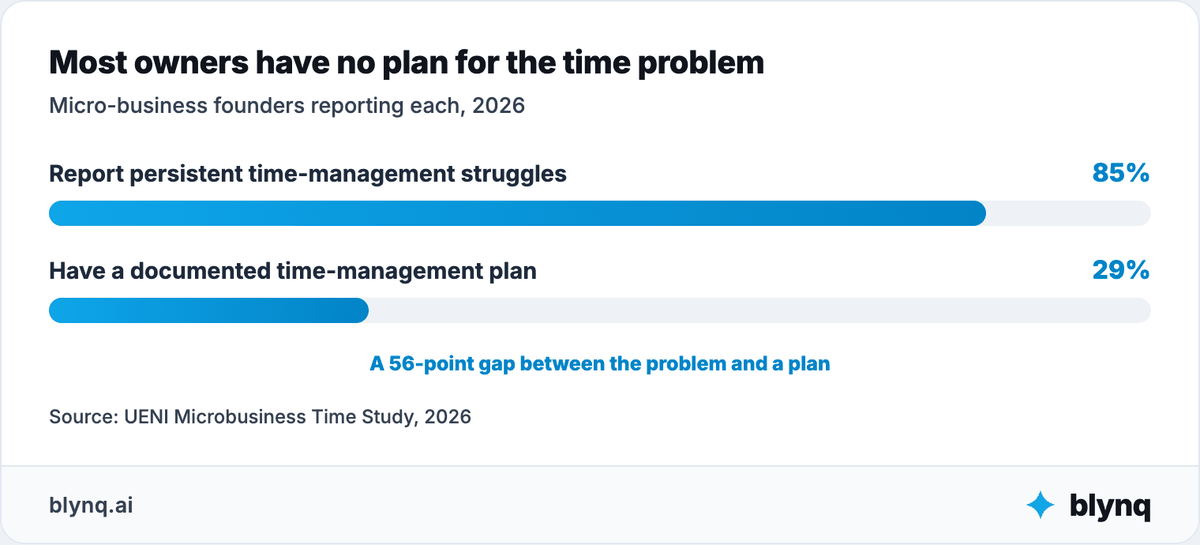
This is the real starting problem: an owner naming a bottleneck alone, with nobody to check the read before spending money on a fix.
Suppose the goal is to stop working weekends. "Automate the busywork" sounds like the obvious answer.
But an overloaded week has at least 6 possible causes:
- Customer communication that never stops.
- Admin that has no fixed time slot, so it fills every gap.
- A task that could be a workflow but still happens by hand.
- Marketing effort with no clear return.
- Pricing that undercharges for the real time a job takes.
- More customers than the business can serve well.
Automating the wrong one of these makes the week worse, not better.
Work this sequence before choosing an agent or tool:
| Step | Owner question |
|---|---|
| Goal | What result needs to change? |
| Bottleneck | What is preventing that result today? |
| Responsibility | Which area owns the problem? |
| Capability | What must AI analyze, recommend or execute? |
| Context | What must it know to give a useful answer? |
| Constraints | What limits budget, time, capacity or risk? |
| Human boundary | What decision or action stays with the owner? |
| Architecture | Is the right fit general AI, a broad agent, a specialized system or an AI team? |
Do not design the business around what AI can do. Design the AI around what the business needs to achieve.
How do roles, skills and tasks show up in a small business?
Roles are the business area an agent owns, skills are what it can do inside that area, and tasks are the work happening right now.
These terms get used interchangeably. Keeping them apart stops an owner buying a separate system for every small job.
| Concept | Definition | Owner example |
|---|---|---|
| Agent | AI entity holding ongoing responsibility | Sales Agent |
| Role | Business domain the agent owns | Sales |
| Skill | Capability used inside the role | Follow-up message drafting |
| Task | Specific work being done now | Draft a reply to this week's 3 stalled leads |
| AI Tool | Product for a particular job | Receipt-scanning tool |
| Automation | Predefined workflow | Send a reminder when an invoice goes overdue |
| Specialized Agent | System owning a narrow ongoing workflow | Customer-message triage across every channel |
| AI Team | Several agents sharing business context | Marketing, Sales and Finance using the same business knowledge |
| AIOS | Operating layer connecting agents, skills, memory, knowledge, tasks and workflows | Shared AI operating environment for the business |
The core idea is simple. Agents are roles. Skills are capabilities. Tasks are the work being done.
Automation alone does not make something an agent. Neither does an "agent" label on a pricing page.
Does every small-business task need its own AI agent?
No. Most small-business tasks are skills inside a role the owner already needs, not grounds for buying another agent.
The taxonomy matters because it stops an AI stack becoming a new kind of software clutter.
Writing one social post is not a Content Agent. It is a task using a writing skill inside Marketing.
Comparing this month's ad spend to last month's is not a Spend-Comparison Agent. It is a task using Marketing and Analytics skills.
A system that reads every inbound message, drafts a reply, logs the outcome and escalates anything unusual is different.
That may qualify as a specialized agent, because it owns a narrow but ongoing workflow.
The difference is responsibility, not branding.
How can AI support the business behind the to-do list?
AI supports the business behind the to-do list in 3 connected places: turning attention into paying customers, keeping delivery moving, and protecting the money underneath.
How do you turn attention into paying customers?
You turn attention into customers by deciding which activity actually produces a sale.
A Marketing Agent and a Sales Agent then work on that answer.
Content generation is already routine.
GoDaddy's Small Business Research Lab found 71% to 73% of small businesses automate copywriting and social content, and 62% to 65% automate document summaries.
The hard question is not how much content AI can produce. It is which activity turns into a paying customer.
Businesses using AI for growth tend to see it.
Salesforce's SMB Trends Report found 91% of AI-adopting small firms reported revenue increases, and adopters grew twice as fast year over year.
A Sales Agent works deeper than a content calendar. It reviews the pipeline, drafts follow-up and flags inquiries that stalled before a decision.
The business question is not only whether AI can post more. It is which leads matter and why follow-up is failing.
How do you keep customers and delivery moving?
You keep delivery moving by giving an Operations Agent the process itself, then using specialized tools for messages, bookkeeping and scheduling.
Small-business work combines customer messages, scheduling, delivery, invoicing and admin, usually handled by the same 1 or 2 people.
An Operations Agent can analyze that process, find where work stalls and clarify what needs attention now.
The gains are documented, not theoretical.
One independent software consultant described running an open-source agent that "handles email triage, calendar, task tracking, bank transaction categorization, morning briefings."
He put the result plainly: "saves me probably 8-10 hours a week."
The biggest win, in his words, is that "stuff that used to fall through the cracks just doesn't anymore."
That is Reddit user kenrick_beckett, posting in r/smallbusiness, a forum where small-business owners compare notes on running their operations.
The result did not come from one point tool.
It came from 1 agent spanning several admin tasks that used to be handled separately, or not at all.
A separate account shows the same pattern outside pure admin.
Reddit user mpclarkson, an automation-agency founder posting in r/smallbusiness, described a client project.
AI document classification for a medical practice saved admin staff "2-3 hours daily" on sorting records.
His caution matters as much as the number: "it's not magic... you'll need someone to set it up. But once running, it mostly just works."
The human still owns judgment calls, pricing, and every promise made to a customer.
How do you protect the money underneath the work?
You protect margin by connecting spend to time saved to actual cash recovered, which is Finance work rather than a productivity feeling.
More activity does not automatically mean a better business. Software costs, unpaid time and inconsistent pricing can hollow out a busy-looking week.
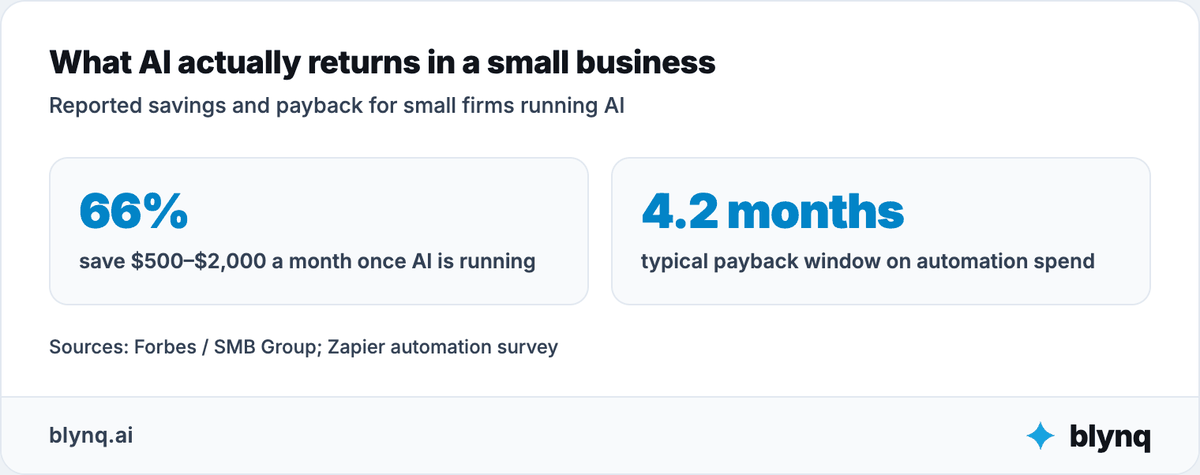
Forbes and SMB Group found 66% of small firms save $500 to $2,000 a month once AI is running.
Zapier's automation survey put the typical payback window at 4.2 months.
One human-in-the-loop pattern shows up often in how the savings actually get protected.
Reddit user tinyhousefever, also in r/smallbusiness, described keeping "a HITL gateway" on every AI-drafted reply.
"I review the generated drafts and polish them before hitting send."
Finance and Analytics can connect what is spent on tools against what gets recovered in hours and revenue.
The goal is not more automation. It is a reasoned choice about which task, tool and hire actually pays for itself.
What does one small-business problem look like followed across the business?
Followed across the business, a busy week usually turns out to be a scattered-admin problem wearing the costume of a time-management problem.
Consider the starting condition most small businesses share.
62% of micro-founders work over 50 hours a week, and admin already crowds out sales and marketing time.
The first instinct is a single tool for the loudest complaint, usually email.
But the account above shows the real fix was not 1 tool for 1 task.
It was 1 agent spanning email triage, calendar and bank-transaction categorization together.
Fixing 1 task in isolation would have freed a few minutes. Connecting several adjacent admin tasks freed 8 to 10 hours a week.
The value came from treating scattered admin as 1 connected problem, not from adding another single-purpose tool to the pile.
Where do specialized small-business AI tools fit?
Specialized small-business AI tools fit where the bottleneck is narrow and execution-heavy.
That covers inbox triage, bookkeeping categorization, invoice chasing, scheduling and single-channel customer support.
Business agents and agents built for one job do different work.
| Business Agent layer | Specialized execution layer |
|---|---|
| Diagnoses, plans and ranks across a role | Performs or owns a defined workflow |
| Uses broad business context | Uses workflow-specific or customer-specific data |
| Connects questions across functions | Goes deeper inside one execution category |
| Example: determine why leads stall before a sale | Example: chase 1 overdue invoice |
The market holds several kinds of product. ChatGPT, Claude and Gemini support general research, writing and analysis.
Zapier connects apps and automates a fixed sequence of steps, which is genuinely different from a system that decides what to do next.
QuickBooks handles bookkeeping automation for a large share of small businesses already, but it executes accounting rules rather than reviewing the business behind the numbers.
These are not interchangeable.
A workflow tool does not decide whether marketing spend is working. A bookkeeping tool does not decide which customer segment to pursue next.
A workflow executes the steps it was given, but the owner still defines the trigger, the exceptions and what happens when something breaks.
Half of small businesses running agentic workflows already lean on outside help to do it.
The Global Technology Industry Association found 50% of AI-invested firms retain an external IT partner for AI operations.
Blynq sits on the business-management side. Its business roles work from shared context across Marketing, Sales, Operations, Finance, Analytics and Strategy.
The right setup often combines both: execution tools for the narrow jobs, and a connected set of business agents for the thinking and the decisions.
Do you need one specialist or a connected AI back office?
You need one specialist when the problem stays inside one responsibility, and a connected AI back office when it crosses several.
Small-business questions cross functions constantly:
Marketing to leads to sales to delivery to cash to the next marketing decision.
A marketing recommendation may depend on which leads actually close. A staffing decision may depend on capacity.
A pricing decision may depend on how much time a job really takes once admin is counted.
Use this rule:
| Situation | Likely starting point |
|---|---|
| One isolated output | Chatbot or tool |
| One repeatable workflow | Automation or specialized agent |
| One ongoing business responsibility | Broad agent role |
| A question crossing several business functions | AI team with shared context |
Why does business context change small-business AI recommendations?
Business context can change small-business AI recommendations completely, because the same question has opposite correct answers for different owners.
Consider a common question: should I hire, or automate this instead?
No responsible answer exists without current revenue and margin.
It also needs how much of the task is judgment versus repetition, and what the owner would do with the time back.
One owner needs more capacity. Another needs better pricing. A third already has enough leads and needs to close more of them.
This is usually where an owner is most alone. Nobody checks the read before the money gets spent, on a hire or on a tool.
Prompt-based work restarts from the same briefing every time: the business, the customer, the numbers, what was already tried.
Context-aware AI starts from validated goals, constraints, decisions and outcomes it already holds.
The owner is not re-explaining the business just to get a useful answer.
Why do AI agents need one shared view of the business?
AI agents need one shared view because otherwise the owner is still doing the connecting.
Marketing performance, sales results and what is actually in the bank stay 3 separate pictures.
Several agents do not become a team because they sit in one menu.
A marketing tool tracks engagement, a sales tool tracks the pipeline, a finance tool tracks cash.
If the owner still connects them by hand, nothing has changed.
Coordination does not disappear once agents are added, it just moves.
The GTIA found 50% of AI-invested small firms deployed operational workflows, and the same share still retain an outside partner to run them.
A useful shared view, sometimes called a Business Brain, holds positioning, customers, pricing, capacity, current priorities and past decisions.
Customer and financial data need stricter access, verified sources and clear retention rules.
Shared context does not replace the owner's judgment. It makes Marketing, Sales, Operations and Finance relevant to the same business.
An AI team becomes an AIOS when agents, skills, knowledge, memory, tasks and workflows grow around that shared understanding.
The goal is not more AI.
The goal is a business that is easier to understand, decide for and run, without the owner holding every connection alone.
What do customers still need from an owner when AI gets faster?
Customers still need the owner's judgment, accountability and the relationship itself, even when AI gets faster.
AI does not make the owner replaceable. It changes which parts of the work customers actually notice.
Most owners agree, and it is not close. FreshBooks found 66.7% of small-business owners disagree that AI replaces their current staff.
The businesses AI-adopting small firms describe are growing, not shrinking.
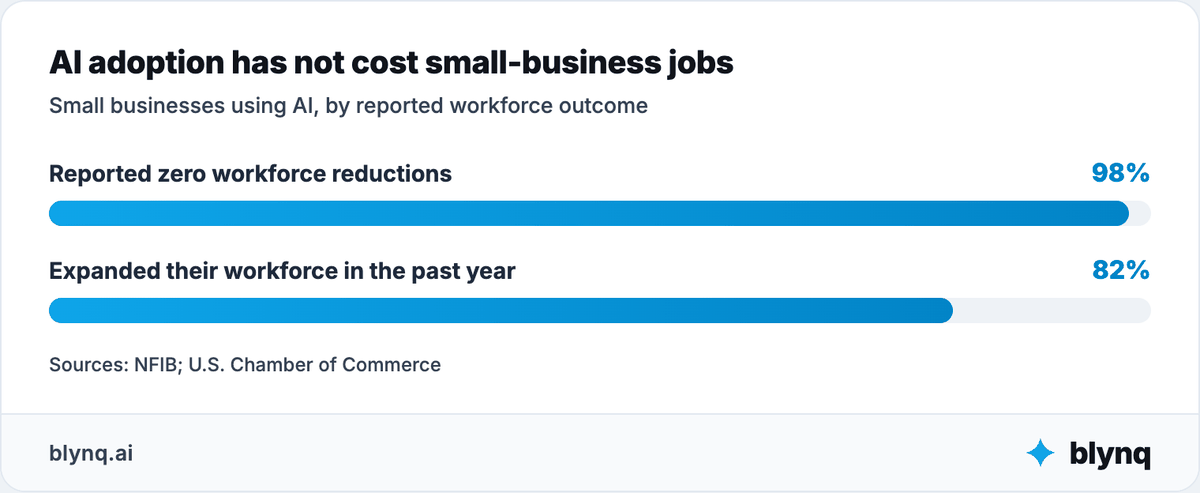
The U.S. Chamber of Commerce found 82% of AI-adopting small businesses expanded their workforce in the preceding year.
NFIB separately found 98% reported zero workforce reductions after adopting AI.
When replies, drafts and reports get faster, customers still need someone who can:
- Recognize when a job does not fit the standard answer.
- Explain a trade-off in plain terms.
- Make a judgment call the AI was never given enough context to make.
- Take responsibility when something goes wrong.
- Remember the relationship, not just the transaction.
- Show up when it counts, in person or on the phone.
One owner who leans on AI for strategy still names this limit directly.
"You have to constantly check its work and read its results," they wrote.
"But I'll be damned if I could produce the sheer quantity of work without it."
That is the honest shape of the trade.
AI expands what one person can produce. It does not remove the person checking whether it is right.
The businesses that do this well use AI to show up more prepared, not to show up less.
Where does small-business AI still need human control?
Small-business AI still needs human control wherever money, a customer promise, a public claim or an employment decision is involved.
The closer AI gets to those, the stronger review should become.
| Area | AI can help with | Human owns |
|---|---|---|
| Customer intake | Basic questions, capture and routing | Sensitive questions and any promise made |
| Follow-up | Drafting, reminders and prioritization | The final message and the relationship |
| Marketing claims | Drafting copy and content | What the business actually claims it can do |
| Bookkeeping | Categorization and exception flagging | Judgment calls and the final numbers |
| Pricing | Organizing scenarios and comparisons | The number the customer actually sees |
| Hiring | Drafting job posts and screening questions | Who gets interviewed and hired |
| Customer disputes | Summarizing the history | The resolution and the tone |
| Contracts | Drafting and comparing terms | What gets signed |
| Data handling | Organizing and retrieving | What leaves the business, and to whom |
| Public communication | Drafting posts and responses | What actually gets published |
Marketing claims deserve particular caution.
The Federal Trade Commission has an active enforcement program against businesses that overstate what their AI-powered product or service can do.
FTC guidance on artificial intelligence
The same caution applies in reverse: claiming a human process is "AI-powered" when it barely uses AI at all invites the same scrutiny.
Hiring carries its own exposure.
An AI tool used to screen or rank candidates is still subject to the same anti-discrimination law a human recruiter would be.
Data privacy is a live concern, not a theoretical one.
The Global Technology Industry Association found 24% of decision-makers cite data security as their main adoption barrier.
Only 44% of small firms have a formal AI acceptable-use policy.
Redact customer names, payment details and anything sensitive before pasting it into a general chatbot.
Check what any vendor's terms say about training on your data.
The correct fallback is usually simple: draft it with AI, then have a person read it before it reaches a customer.
AI should have an escalation path, not an unlimited mandate.
How do you choose the right AI setup for a small business?
You choose the right AI setup for a small business by evaluating its operating model, not its label.
Ask 6 questions of anything you are considering:
- What responsibility or workflow does it help own?
- What can it analyze, recommend or execute?
- What business or customer data can it access, and under what terms?
- Does it rely on verified source data?
- What must the owner review and approve?
- Does it integrate with the tools that matter, and show what it did?
Consider 3 legitimate approaches:
| Approach | Strengths | Trade-offs | Best fit |
|---|---|---|---|
| Custom build | Maximum control and business-specific rules | Technical ownership, maintenance and integration risk | Owners with technical support and a distinctive process |
| Self-directed Claude or ChatGPT | Flexibility, strong analysis and custom projects | The owner designs the context, memory and workflow | Owners who want to design their own setup |
| Ready-made AI team or purpose-built SaaS | Faster setup, structured roles and continuity | More opinionated and limited to supported capabilities | Owners who want structure without building it |
The last row has several named options, and they are not identical.
Sintra AI offers 12 named specialist assistants covering marketing, sales, SEO and support in 1 chat platform, best suited to very small, non-technical businesses.
Marblism offers 6 named AI employees sharing 1 memory it calls "the Brain," at a lower price point than most alternatives in this category.
Lindy AI is narrower by design.
Lindy is 1 always-on assistant handling email, scheduling and calls, built for someone who wants a single assistant rather than a named team.
Blynq is a fourth option here, an AI team of 11 named agents built around a persistent Business DNA.
Judge all 4 on the same 6 questions above rather than on which one is named first.
Configuration, not capability, decides most outcomes. GTIA found technical support needs split evenly across tool selection and training (38% each) and multi-system integration (31%).
Before committing, verify the system actually reads from and writes to what matters: the inbox, the calendar, the accounting software, the CRM.
Check permissions, activity logs and failure handling. Ask what happens when a sync fails silently, because that costs more than it saves.
Do not assume "works with" means "integrates with."
If you constantly re-brief the system and copy data between tools, the AI is adding management work.
How do you put AI to work in your small business in 30 days?
Put AI to work in 30 days by picking 1 measurable goal and diagnosing the bottleneck behind it.
Run the agent alongside your current process, then expand only where it earned the expansion.
Start with the goal, not the tool.
Week 1: Diagnose
Choose a goal and a bottleneck. Do not start with a product.
Common candidates: a backlog that never clears, follow-up that stalls, or a week that always runs long.
Define the 1 metric that would show improvement.
Exit criterion: a named metric and a current baseline number, written down.
Week 2: Build context
Give the system what judgment requires: the business, the customer base, pricing, capacity and recent decisions.
Decide what stays private or needs controlled access. Customer and payment data belong in that category by default.
Exit criterion: the agent answers a question about the business without needing to be re-briefed.
Week 3: Run alongside the current process
Use the agent for analysis, planning or structured work while the existing process stays visible.
Review errors, missing context and recommendations that do not fit how the business actually runs.
Exit criterion: a written list of what it got wrong and what context was missing.
Week 4: Evaluate and expand carefully
Measure the metric from Week 1. Record what the system learned and what still needs the owner's judgment.
Add another skill or role only when it solves a real adjacent problem.
If the second role depends on knowledge from the first, prioritize shared context over another disconnected tool.
Exit criterion: a keep-or-drop decision supported by the baseline number.
Example setup for a 1-5 person small business
Suppose the goal is a shorter week without losing revenue.
| Setup layer | What to include |
|---|---|
| Business context | Customers, pricing, current workload, capacity and recent priorities |
| Productivity Agent | Review the week, identify what is eating time and recommend a realistic focus |
| Analytics Skill | Compare time spent by task against what each task is actually worth |
| Specialized workflow | Triage inbound messages, draft replies and flag anything needing the owner |
| Human boundary | The owner handles pricing, promises made to customers and anything unusual |
| Success measure | Fewer hours worked after 30 days, without losing revenue or response time |
This is enough for a first setup. It needs no separate agents for messages, scheduling, bookkeeping and reporting.
Start with the responsibility, add the skills and workflow it needs, and expand only when a problem genuinely crosses into a new role.
What to do now
Pick 1 result that needs to change this month, and write down the number that measures it today.
Diagnose what is actually blocking it, using the 8-step sequence above. The bottleneck is rarely where the first instinct points.
Decide what stays with the owner: pricing, promises made to customers, hiring and anything the business's reputation rests on.
Then choose the setup that fits what remains.
The read does not have to happen alone. Check it against real numbers before spending on a hire or a tool.
AI agents help most when they own a real responsibility, use several skills and understand the business behind the task.
The future is not a separate bot for every task. Expect fewer capable agents, specialized execution where it earns its place, and shared context underneath.
The point is not to add more AI. It is to make the business easier to understand, decide for and run.