




What are AI agents for photographers?
AI agents for photographers are systems that take ongoing responsibility for part of a studio: Operations, Marketing, Sales or Client Experience.
Specialized agents own narrower work instead, such as culling a shoot or drafting client emails.
Some act on their own. Others analyze, recommend a next step and prepare the work for your review.
That difference matters more than the label on the pricing page.
Adoption among working photographers is close to universal.
VSCO's 2026 Industry Research Report found 83% of surveyed photographers already use AI, and only 4% have never tried it.
The open question for most studios is not whether to use AI. It is what to hand over first, and what stays yours.
Blynq is one option on the studio-management side. Aftershoot, Imagen AI and FilterPixel sit on the execution side.
This guide starts with the question, not the products.
Learn how to run your business with an AI teamWhich AI agents can help run a photography studio?
The AI agents that help run a photography studio are 8 business roles: Marketing, Sales, Operations, Client Experience, Finance, Analytics, Strategy and Productivity.
The useful starting point is not a separate agent per shoot, gallery or client.
A small set of agents works better, each owning a meaningful part of the studio.
| AI Agent | What it can help a photographer do | Most useful when |
|---|---|---|
| Marketing Agent | Clarify positioning, plan content and get the studio found in AI search | Inquiries dried up or referrals stopped replacing them |
| Sales Agent | Qualify inquiries, prepare quotes and follow up before a client books elsewhere | Inquiries arrive but bookings stall before a contract |
| Operations Agent | Review the post-production pipeline, delivery deadlines, bookings and capacity | Editing backlog grows every week and delivery slips |
| Client Experience Agent | Improve gallery updates, organize recurring questions and flag at-risk bookings | Clients chase you for their gallery or leave unclear reviews |
| Finance Agent | Review cost per image, package pricing, editing spend and margin | Bookings are full but the studio barely turns a profit |
| Analytics Agent | Connect inquiry sources, bookings, package mix and margin | Data sits in the CRM, the editing tool and a spreadsheet separately |
| Strategy Agent | Compare specialties, client segments and package structures | The studio takes any shoot rather than the ones that pay |
| Productivity Agent | Turn shoots, deliveries and admin into a realistic weekly focus | Every weekend booking creates a week of catch-up |
These 8 support the business side. Photographers also use specialized agents and tools for narrow execution.
Common examples include culling, batch editing, retouching, gallery delivery and client email drafting.
The distinction matters. An Operations Agent can diagnose why delivery keeps slipping. A culling agent sorts 3,000 RAW files from 1 wedding.
One supports the business decision. The other runs a defined workflow.
What counts as an AI agent in photography?
An AI agent in photography is software that holds an ongoing responsibility. A chatbot answers one question; a tool finishes one job.
The terms get confusing quickly. Here is the simplest way to tell the 4 shapes apart.
| Chatbot | AI Tool | AI Agent | AI Team | |
|---|---|---|---|---|
| What it does | Answers a question | Completes a specific job | Helps own an ongoing responsibility | Helps across several parts of the studio |
| What you do | Ask each question | Open or trigger it when needed | Give it a goal or responsibility | Give the team access to shared studio context |
| What it knows | Usually the conversation or limited product memory | Information needed for its job | Context relevant to its role | Context shared across different specialists |
| Photographer example | "Write a caption for this gallery" | Cull 3,000 RAW files from a wedding | Own delivery timelines across every active booking | Operations, Marketing and Finance work from the same studio understanding |
So stop asking whether something is technically an agent. Ask 3 better questions instead.
What will it take responsibility for? What information will it use? What will you still have to review?
How can AI help you run a photography studio?
AI helps run a photography studio by removing the culling backlog, repetitive email drafting, gallery-status guesswork and the manual work of connecting bookings to margin.
Find your problem in the left column before shopping for anything.
| Recurring problem | What AI can help remove | Best-fit agent or AI setup | When to prioritize it |
|---|---|---|---|
| The editing backlog never clears | First-pass culling and batch color correction | Operations Agent + editing tool | When Sunday nights disappear into a laptop |
| Delivery keeps slipping past the deadline | Status tracking and gallery-turnaround visibility | Operations Agent + delivery workflow | When clients start asking where their photos are |
| Inquiries go unanswered for a day | Repetitive first response and quote preparation | Sales Agent + inquiry workflow | When couples book the studio that replies first |
| Client emails eat the evening | Drafting replies in your voice for review | Client Experience Agent + email workflow | When correspondence competes with editing time |
| The studio is invisible in AI search | Structuring the site so AI answer engines can cite it | Marketing Agent + GEO workflow | When inquiries used to come from Google and have not moved to AI search |
| Camera settings and menus slow you down | Fast lookup against the manual instead of memory | Specialized reference tool | When a rented or new body has an unfamiliar menu |
| Pricing does not reflect editing time | Connecting package price to hours actually spent | Finance Agent + Analytics Skill | When a package looks profitable but never is |
| Retouching requests are inconsistent | Organizing what was promised per client, per package | Client Experience Agent | When 2 clients get different results for the same package |
| Bookings outpace editing capacity | Connecting calendar, gallery backlog and available hours | Operations Agent + Productivity Agent | Before opening the calendar for another season |
| Marketing spend is disconnected from bookings | Connecting inquiry source, booking rate and cost | Marketing, Sales, Finance and Analytics | When a channel generates likes but few bookings |
| Priorities are unclear | Connecting goals, deadlines, commitments and constraints | Strategy Agent + Productivity Agent | When every weekend feels urgent |
This is a map, not a shopping list. Some problems need a tool. Others need a skill inside a business role.
Others still need a specialized agent that owns a workflow, or several agents working from shared context.
Diagnose the bottleneck before choosing the system.
How should a photographer choose what to give an AI agent first?
A photographer should choose the first AI agent from the bottleneck blocking a named business result, not from the most impressive editing demo.
Suppose you want your evenings back without missing a delivery deadline. "Automate the culling" sounds like the obvious answer.
But a studio buried in backlog has at least 7 possible causes:
- Too many bookings accepted relative to editing capacity.
- Package pricing that does not account for real editing hours.
- No standard workflow, so every gallery gets edited from scratch.
- Client communication eating hours that should go to delivery.
- Culling that still needs a full manual review pass.
- Marketing that books the wrong kind of shoot for your actual capacity.
- More active clients than the studio can serve at the quality you promise.
Automating culling alone would make several of these worse, not better.
One photographer on Reddit's r/WeddingPhotography, a forum where wedding and event photographers compare workflows, described exactly this ceiling.
"It's not helpful. It picks bad shots. It requires you to review the selection and the selection will probably be either very loose or shit, by which point you might as well cull it from scratch."
Reddit user josephallenkeys wrote that after testing AI culling, and abandoned it for that part of the workflow entirely.
Automation applied to a step AI cannot yet do well accelerates nothing. Diagnose the actual bottleneck first.
Work this sequence before choosing an agent or tool:
| Step | Photographer question |
|---|---|
| Goal | What business result needs to change? |
| Bottleneck | What is preventing that result today? |
| Responsibility | Which area owns the problem? |
| Capability | What must AI analyze, recommend or execute? |
| Context | What must it know to give a useful answer? |
| Constraints | What limits budget, time, capacity or risk? |
| Human boundary | What judgment stays yours? |
| Architecture | Is the right fit general AI, a broad agent, a specialized system or an AI team? |
Do not design the studio around what AI can do. Design the AI around what the studio needs to achieve.
How do roles, skills and tasks show up in photography?
Roles are the business area an agent owns, skills are what it can do inside that area, and tasks are the work happening right now.
These terms get used interchangeably. Keeping them apart stops you buying a separate system for every small job.
| Concept | Definition | Photographer example |
|---|---|---|
| Agent | AI entity holding ongoing responsibility | Operations Agent |
| Role | Business domain the agent owns | Operations |
| Skill | Capability used inside the role | Delivery-timeline review |
| Task | Specific work being done now | Check why 3 galleries are running late |
| AI Tool | Product for a particular job | Culling tool |
| Automation | Predefined workflow | Send a gallery-ready email when editing finishes |
| Specialized Agent | System owning a narrow ongoing workflow | Inquiry response and quote preparation |
| AI Team | Several agents sharing studio context | Operations, Marketing and Finance using the same studio knowledge |
| AIOS | Operating layer connecting agents, skills, memory, knowledge, tasks and workflows | Shared AI operating environment for the studio |
The core idea is simple. Agents are roles. Skills are capabilities. Tasks are the work being done.
Automation alone does not make something an agent. Neither does an "agent" label on a pricing page.
Does every photography task need its own AI agent?
No. Most photography tasks are skills inside a role you already have, not grounds for buying another agent.
The taxonomy matters because it stops an AI stack becoming a new kind of software clutter.
Writing one Instagram caption is not a Social Media Agent. It is a task using a content skill inside Marketing.
Culling a single gallery this week is not a Culling Agent. It is a task using an Operations skill and an editing tool.
A system that answers every inquiry, prepares a quote, follows up and updates the booking calendar is different.
That may qualify as a specialized agent, because it owns a narrow but ongoing workflow.
The difference is responsibility, not branding.
How can AI support the studio behind the galleries?
AI supports the studio behind the galleries in 3 connected places: winning the right bookings, delivering them well, and protecting the economics underneath.
How do you turn inquiries into booked clients?
You turn inquiries into bookings by responding fast and following up, then letting a Sales Agent handle the repetitive parts of that job.
Speed matters more than most studios assume. A Marketing Agent can clarify positioning and get a studio visible where clients now search.
One studio owner on Reddit's r/WeddingPhotography described the shift already underway.
"about a month ago I updated my site and added a custom schema so that I would show up as a result in chatGPT... the AI scans sites and they need to see certain info on the site formatted properly to recommend. So maybe that's why I'm starting to get leads from there."
Reddit user kpietrowski wrote that.
A second studio owner in the same thread, FreasFrames, reported ranking for 240+ wedding-related queries.
That followed 8 months of deliberate work on AI visibility.
A Sales Agent works deeper than an autoresponder. It can prepare a quote, answer qualifying questions and flag the inquiries worth a personal follow-up.
The business question is not only whether AI can reply fast.
It is which inquiries convert, and what a client needs to hear before they book.
How do you keep editing and delivery moving?
You keep delivery moving by giving an Operations Agent the pipeline itself, then using specialized tools for culling, editing and gallery status.
Studio work combines shoot logistics, a growing RAW backlog, client expectations and several deadlines running at once.
An Operations Agent can analyze that pipeline, find where galleries stall and clarify what needs attention now.
The efficiency gain is real and independently corroborated. One photographer on Reddit's r/WeddingPhotography put a number on it.
"Aftershoot for cull. Imagen for preset, WB, exposure, crop and straighten. I think it cuts down on overall post production time by 60%. Maybe 70%. I still have to quality check quite a bit."
Reddit user Serial_Doubter wrote that, and still budgets real time for quality checks.
That matches the pattern across this KB: AI compresses editing, it does not remove review.
Client Experience uses the same context to prepare gallery updates and answer the questions that repeat every booking.
AI should help you remember and prepare. It should not impersonate warmth or make delivery feel automated.
The human still owns shot selection judgment, retouching calls, creative direction and every promise made to a client.
How do you protect margin and pricing?
You protect margin by connecting package price to editing hours to delivered value, which is Finance and Analytics work rather than editing work.
More bookings do not automatically mean a better studio. Software subscriptions, outsourced editing and unpriced revision requests can hollow out a full calendar.
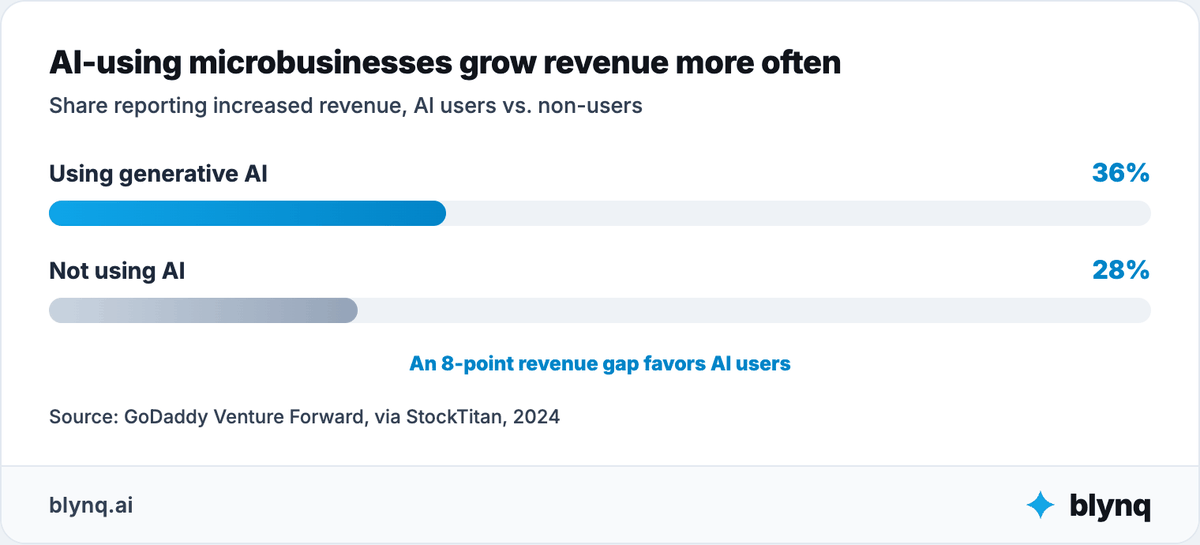
The revenue evidence favors adopting AI deliberately. GoDaddy's Venture Forward research found AI-using microbusinesses report increased revenue more often than non-users, at 36% versus 28%.
Finance and Analytics can connect package type, editing hours, delivery cost and margin.
Strategy and Productivity then connect those findings with capacity, specialty and a realistic weekly focus.
The goal is not more possible actions. It is a reasoned choice about which bookings, packages and clients deserve limited attention.
What does one studio problem look like followed across the business?
Followed across the business, one editing-backlog problem usually turns out to be a booking-volume and pricing problem instead.
Consider a solo wedding photographer whose Sunday nights disappear into editing every week. The instinct is to buy an AI culling subscription.
Operations analysis shows the backlog tracks booking volume, not editing speed. This season already has more weddings than last year at the same price.
Analytics finds the busiest month is also the one with the most late-delivery complaints.
Finance shows the mid-tier package is priced below what its editing time actually costs.
Marketing reveals inquiries mostly come through one referral source that consistently books the underpriced package.
Strategy recommends repricing that package and capping monthly bookings before adding any editing tool.
A culling tool still helps once the calendar is sane. But automating editing first would have let an unprofitable booking pace continue longer.
The value comes from examining one problem through connected business perspectives, before execution scales it.
Where do specialized photography AI tools and agents fit?
Specialized photography AI tools and agents fit where the bottleneck is narrow and execution-heavy.
That covers culling, batch editing, retouching, gallery delivery and client scheduling.
Business agents and agents built for one job do different work.
| Business Agent layer | Specialized execution layer |
|---|---|
| Diagnoses, plans and ranks across a role | Performs or owns a defined workflow |
| Uses broad studio context | Uses shoot-specific or client-specific data |
| Connects questions across functions | Goes deeper inside one execution category |
| Example: determine why delivery keeps slipping | Example: cull 3,000 RAW files from a wedding |
The market holds several kinds of product. ChatGPT, Claude and Gemini support general research, drafting and analysis.
Aftershoot and Imagen AI both cull and edit, priced differently: one a flat annual fee, the other by the image.
One studio owner on Reddit's r/WeddingPhotography compared the two directly.
"I LOVED Imagen. It was the best asset to my photo business. But the costs accrued quickly. The 5 cent an image added up big time... For a flat fee I had the freedom to know I can edit all I want with no worry... aftershoot saves thousands of dollars at the end of the year..."
Reddit user jkahn923 wrote that after switching from per-image to flat-fee pricing.
That is the real trade-off between these 2 tools: predictable cost at volume versus pay-per-use flexibility.
FilterPixel focuses on culling specifically. Evoto AI focuses on retouching and generative edits.
These are not interchangeable. A culling tool does not decide whether your mid-tier package is priced correctly.
A retouching tool does not decide which bookings to accept.
An editing workflow executes your presets, but you define the style, the exceptions and the final pass.
Blynq sits on the studio-management side. Its business roles work from shared context across Marketing, Sales, Operations, Finance, Analytics and Strategy.
The right setup often combines both: editing tools for execution, and a connected set of business agents for the thinking and the decisions.
Do you need one specialist or a connected AI back office?
You need one specialist when the problem stays inside one responsibility, and a connected AI back office when it crosses several.
Studio questions cross functions constantly:
Marketing to inquiries to bookings to delivery to reviews to referrals to the next marketing decision.
A marketing recommendation may depend on which packages are profitable. An operations priority may depend on booking volume.
A pricing decision may depend on editing hours and the season ahead.
Use this rule:
| Situation | Likely starting point |
|---|---|
| One isolated output | Chatbot or tool |
| One repeatable workflow | Automation or specialized agent |
| One ongoing business responsibility | Broad agent role |
| A question crossing several business functions | AI team with shared context |
Why does business context change photography AI recommendations?
Business context can change photography AI recommendations completely, because the same question has opposite correct answers for different studios.
Consider a common question: should I raise my prices?
No responsible answer exists without current booking volume, editing hours per package, referral sources, delivery reliability and what the local market will bear.
One studio needs more bookings. Another needs fewer at a higher price.
A third already has more work than it can deliver at the promised quality.
Prompt-based work restarts from the same briefing every time: specialty, packages, editing workflow, software stack and recent results.
Context-aware AI starts from validated goals, constraints, decisions, actions, outcomes and lessons it already holds.
It should not remember everything indiscriminately. It should separate verified studio knowledge from assumptions and retrieve only what the current decision needs.
Why do AI agents need one shared view of the studio?
AI agents need one shared view because otherwise you are the integration point, manually carrying booking volume into pricing and editing capacity into marketing.
Several agents do not become a team because they sit in one menu.
If Operations knows the editing backlog, Marketing knows inquiry sources and Finance knows margin by package, but you connect them by hand, nothing has changed.
A useful shared view holds positioning, specialty, packages, pricing, editing workflow, capacity, current priorities and past decisions.
Client photos and contact details need stricter access, verified sources and clear retention rules than any of that.
Shared context does not replace creative judgment. It makes Marketing, Sales, Operations and Finance relevant to the same studio.
An AI team becomes an AIOS when agents, skills, knowledge, memory, tasks and workflows grow around that shared understanding.
The goal is not more AI. It is a photography studio that is easier to understand, decide for and run.
What do clients still need from a photographer when AI gets faster?
Clients still need a photographer for creative direction, judgment and accountability, even when editing gets faster.
AI does not make photographers irrelevant. It changes which parts of the job clients value.
Adoption is close to universal, and that alone raises the bar.
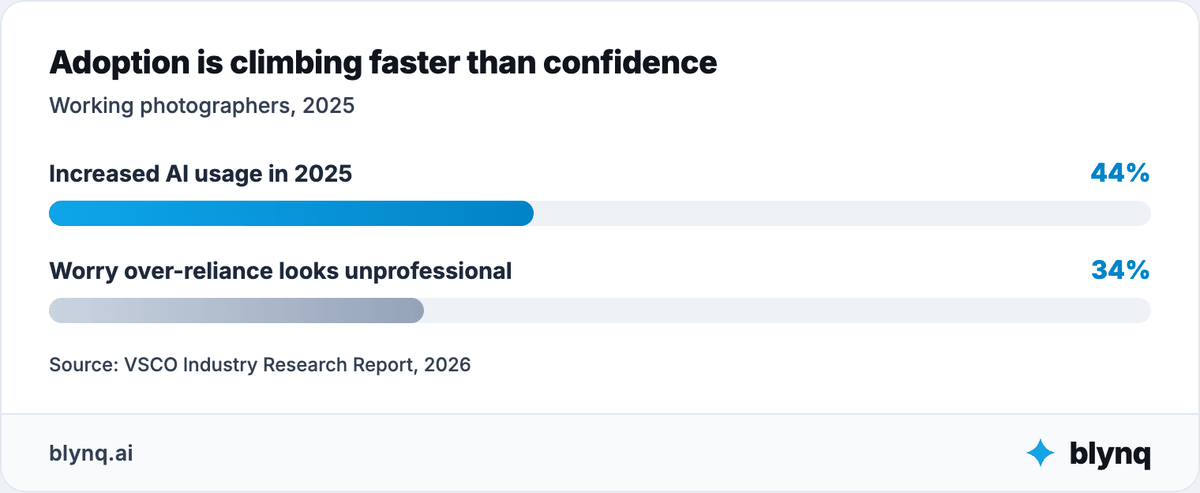
VSCO's research found 44% of working photographers increased their AI usage in 2025, with only 4% who have never tried it.
Faster editing is now table stakes, not a differentiator, which shifts what a client is actually paying a studio for.
That shift carries real risk if handled carelessly.
The same research found 34% of photographers worry that over-reliance on AI could make their studio look unprofessional.
When culling, batch editing and first-pass retouching get faster, clients still need someone who can:
- Read a couple or client and know what shot they will actually treasure.
- Recognize when a moment does not fit the shot list and adapt on the spot.
- Make retouching judgment calls that respect how a client wants to look.
- Negotiate scope, usage rights and reshoots when plans change.
- Coordinate with venues, planners and other vendors on the day.
- Take responsibility for the final images and what happens to them next.
One path uses AI mainly to edit faster and deliver more volume at the same price.
The other uses it to protect time for the parts of the job a client is actually paying for: presence, judgment and taste.
The second path strengthens your role. The value moves from processing images toward directing and curating them.
Where does photography AI still need human control?
Photography AI still needs human control wherever copyright, client consent, creative direction or a studio's reputation is involved.
The closer AI gets to those, the stronger review should become.
| Area | AI can help with | Human owns |
|---|---|---|
| Inquiry response | Basic questions, capture and routing | Tone, pricing judgment and sensitive questions |
| Booking follow-up | Reminders, quote preparation and defined workflows | Relationship judgment and personal outreach |
| Shot list prep | Organizing a client's brief into a working shot list | Composition, timing and every decision on the day |
| Culling | First-pass sorting and flagging | Final selection and what represents the studio |
| Editing | Batch color, exposure and style-match passes | Retouching judgment and the final quality check |
| Retouching | Object removal and basic smoothing | Consent-sensitive edits and how a client is portrayed |
| Gallery delivery | Status tracking and client updates | What ships and when it is ready |
| Client communication | Drafting and organizing recurring questions | Tone, empathy and difficult conversations |
| Licensing and usage rights | Organizing contract terms | What rights are granted, and to whom |
| Marketing content | Drafting and repurposing | Brand voice, approval and what represents the work |
Copyright deserves particular caution.
Purely AI-generated images may not qualify for copyright protection under current US Copyright Office guidance, which matters for a studio selling usage rights.
US Copyright Office guidance on AI and copyright
Client consent is its own live issue.
Some clients now request "no-AI" clauses in their contracts, spanning generative edits, dataset training and how a studio's own portfolio images get used.
Photographers are already redirecting product feedback into their workflow. One put it plainly after testing AI culling.
"It's not helpful. It picks bad shots. It requires you to review the selection and the selection will probably be either very loose or shit, by which point you might as well cull it from scratch... I'm completely abandoning AI from that aspect of my business."
That comment came from josephallenkeys on Reddit's r/WeddingPhotography.
Culling is the clearest example of AI needing supervision rather than delegation.
It still requires a full manual review pass for many studios, which is why the time saved is real but partial.
The correct fallback is usually simple: review before anything reaches a client gallery.
AI should have an escalation path, not an unlimited mandate.
How do you choose the right AI setup for a photography studio?
You choose the right AI setup for a photography studio by evaluating its operating model, not its label.
Ask 6 questions of anything you are considering:
- What responsibility or workflow does it help own?
- What can it analyze, recommend or execute?
- What studio or client data can it access, and where is that stored?
- Does it rely on your own edited work, or a generic model?
- What must you review and approve before delivery?
- Does it integrate with the systems that matter, and show what it did?
Consider 3 legitimate approaches:
| Approach | Strengths | Trade-offs | Best fit |
|---|---|---|---|
| Custom build | Maximum control and a workflow matched to your style | Technical ownership, maintenance and integration risk | Studios with technical support and a distinctive process |
| Self-directed Claude or ChatGPT | Flexibility, strong analysis and custom projects | You design the context, memory and orchestration | Photographers who want to design their own setup |
| Ready-made AI team or purpose-built SaaS | Faster setup, structured roles and continuity | More opinionated and limited to supported capabilities | Photographers who want structure without building it |
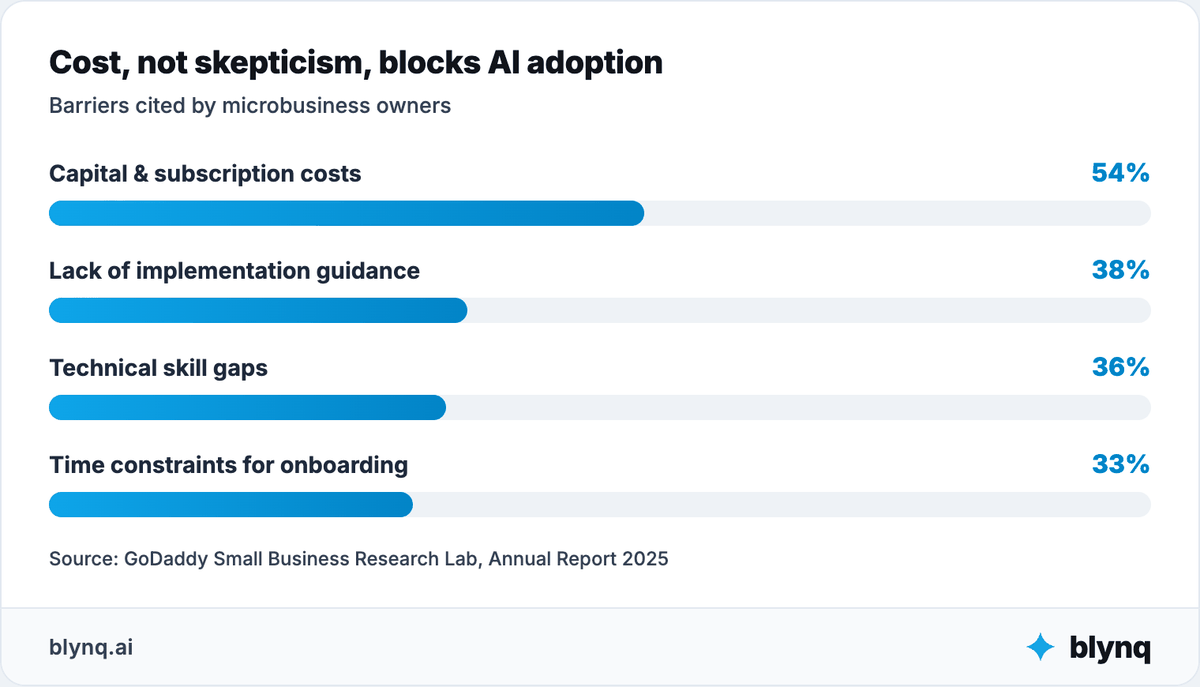
Configuration effort, not skepticism, is what stops most studios here.
GoDaddy's Small Business Research Lab found capital constraints and subscription costs are the top barrier, at 54%.
That ranks ahead of a lack of implementation guidance at 38%, technical skill gaps at 36%, and onboarding time constraints at 33%.
Before committing, verify the system actually reads from and writes to what you need.
That means your booking calendar, your CRM, your editing software and your gallery-delivery platform.
Check permissions, approvals, activity logs and failure handling.
Do not assume "works with" means "integrates with." If you constantly re-brief the system and copy data between tools, the AI is adding administrative work.
How do you put AI to work in your photography studio in 30 days?
Put AI to work in 30 days by picking 1 measurable goal and diagnosing the bottleneck behind it.
Run the agent alongside your current process, then expand only where it earned the expansion.
Start with the goal, not the tool.
Week 1: Diagnose
Choose a goal and a bottleneck. Do not start with a product.
Common candidates: a growing editing backlog, slow inquiry response, or a package that never turns a profit.
Define the 1 metric that would show improvement.
Exit criterion: a named metric and a current baseline number, written down.
Week 2: Build context
Give the system what judgment requires: specialty, packages, pricing, editing workflow, booking calendar, capacity and past decisions.
Decide what stays private or needs controlled access. Client photos and contact details belong in that category by default.
Exit criterion: the agent answers a question about your studio you did not have to re-explain.
Week 3: Run alongside the current process
Use the agent for analysis, planning or structured work while the existing process stays visible.
Review errors, missing context and recommendations that do not fit how you actually shoot and edit.
Exit criterion: a written list of what it got wrong and what context was missing.
Week 4: Evaluate and expand carefully
Measure the metric from Week 1. Record what the system learned and what still requires your judgment.
Add another skill or role only when it solves a real adjacent problem.
If the second role depends on knowledge from the first, prioritize shared context over another disconnected tool.
Exit criterion: a keep-or-drop decision supported by the baseline number.
Example setup for a solo wedding photographer
Suppose the goal is clearing the editing backlog without missing a delivery deadline.
| Setup layer | What to include |
|---|---|
| Business context | Specialty, packages, pricing, editing workflow, booking calendar and capacity |
| Operations Agent | Review the delivery pipeline, identify where galleries stall and recommend what to fix first |
| Analytics Skill | Compare editing hours, delivery time and margin by package |
| Specialized workflow | Cull and batch-edit new shoots, flagging anything needing a manual pass |
| Human boundary | You handle final selection, retouching judgment, creative direction and client relationships |
| Success measure | Galleries delivered on time for 90% of bookings after 30 days, without weaker editing quality |
This is enough for a first setup. It needs no separate agents for culling, editing, delivery tracking and client updates.
Start with the responsibility, add the skills and workflow it needs, and expand only when a problem genuinely crosses into a new role.
What to do now
Pick 1 business result that needs to change this season, and write down the number that measures it today.
Diagnose what is actually blocking it, using the 8-step sequence above. The bottleneck is rarely where the first instinct points.
Decide what stays human: shot selection, retouching judgment, creative direction and client relationships. Then choose the setup that fits what remains.
AI agents help most when they own a real responsibility, use several skills and understand the studio behind the task.
The future is not a separate tool for every task. Expect fewer capable agents, specialized execution where it earns its place, and shared context underneath.
The point is not to add more AI. It is to make the photography studio easier to understand, decide for and run.